
Dice Master
Formula math, color subtotals
Choose the dice, tap the screen, and the total appears the moment they stop, with every value that went into it.
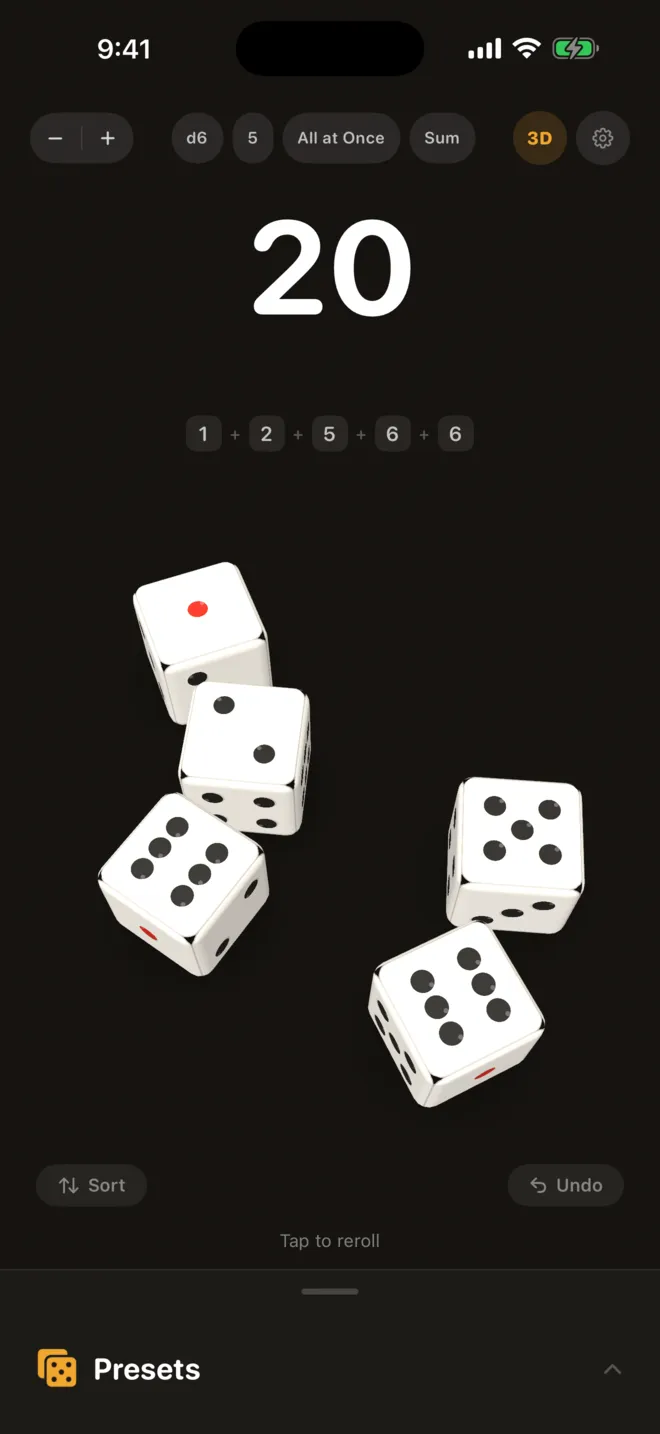
01
Roll, and the math is done
When the dice stop, the result appears in large type with each value lined up beneath it. Choose the formula the game calls for, such as Sum, Product, Highest or Lowest. Give the dice different colors and each color gets its own subtotal.
- 6 formulas, including Sum, Product and Highest
- Subtotals by dice color
- Switch between 3D dice and a 2D view
- All at OnceRoll them all, then lock the ones you keep
- One by OneEach roll adds to a running total
- Sum LimitGo over it and the round is a bust
Roll Limit2 to 20 rolls
Sum Limit1 to 999
02
Rules that fit the game
Set the faces, dice count and roll mode to match the rules on the box. In All at Once, tap a die to lock it and reroll the rest. In One by One, every roll adds to a running total, and going over the Sum Limit ends the round in a bust. Save the setup to My Presets and bring it back later.
- All at Once and One by One roll modes
- Dice locking and a roll limit
- Sum Limit with bust
03
Quick Presets for many games
Dice setups for board games, party games, casino games and tabletop RPGs come built in. Games such as Craps, Sic Bo and Farkle get a verdict after every roll.
- 17 Quick Presets
- Roll verdicts for 10 games
- Game search and hiding
04
Picks up where you left off
The app opens with last time's dice setup. No account, and rolling works offline.
- No account
- Works offline
Dice Master Pro
Bigger dice,
and more of them
- Dice beyond 10 faces (d12, d20, d100)
- Roll up to 20 dice at once
- Neon, Thunder, Gold and Flame skins
- Custom dice face icons
- Unlimited saved presets
- Full roll history and statistics
Support
Questions and contact details are on the support page.