 Percentime
Questions
What do I see when I first open it
Today, this week, this month, this quarter and this year are already there. Nothing to enter. The 2020s are left off the first screen; pick them in the stack rows or in a widget and they come along too.
The card at the top is the stack. Short spans sit above, long ones below. Choose rows sets what goes there.
What happens when a span ends
It does not drop to zero. The filled span is held for fifteen minutes and marked Filled, then the next span opens right after it. This keeps 100 percent from falling to 0 percent at midnight.
A timer of your own that passes its goal does not stop there: the time past the goal stacks up in the accent color.
How are the cells decided
The span is cut to the unit one step down. A day is 24 hours, this week is 7 days, this month is about 30 days, this quarter is 14 weeks, this year is 12 months, the 2020s are 10 years. Spans that do not land on calendar units get their units grouped: 35 days become 5 weeks, 90 minutes become 30 cells of 3 minutes.
How are the decimal places chosen
The span decides. A day is whole numbers, a week one place, a month and a quarter two, a year three, several years four. They are picked so the last digit moves about every ten or twenty minutes.
Pick the progress reading and set the places yourself and that value is used. More places also means a finer redraw: six places redraw up to thirty times a second. Without Pro the reading is cut at one place.
The ring in the middle of the full screen
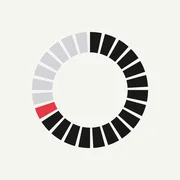
The span is cut into cells and laid around a ring. The percentage sits large in the centre with the count of filled cells beneath it. A span that does not divide into cells is drawn as one unbroken ring.
There are three colours. Cells behind you set in ink, the one cell filling now in the accent, and the cells ahead left as a pale line. When the span fills, the accent leaves the screen. That is how arrival is shown.
How often do the widgets change
They are redrawn the moment the percentage changes. A day widget gains one percent every 14 minutes 24 seconds and reads exactly 50 percent at noon. A span of 30 days is redrawn every 4 minutes 19 seconds.
Making your own timer
Tap the plus button and pick a length first. A day, a week, 30 days, 100 days, a year, or Custom. The goal moves that far ahead. Pick Custom to set a start in the past or to set the time of day.
What readings are there
Four. A combination of units such as years, months, days and a clock; one unit as a decimal; progress in percent; and life units. Life units count full moons, weekends, springs and birthdays, and they are part of Pro.
Tap the number on the full screen and the readings come round in turn. Progress is left out of that turn because the big number already shows it.
When do notifications arrive
A timer with Notify me when the goal arrives turned on sends one notification at the goal. The calendar spans do not use it, so nothing arrives every night.
Span alerts are part of Pro. They arrive when the span reaches 25, 50, 75 or 100 percent, whichever you picked. Points still ahead in this turn are scheduled, and opening the app sets up the next turn.
What is free
The six calendar spans, all six timer widget sizes, the stack widget and syncing between devices work without Pro. You keep three timers of your own, and the calendar spans never count toward that. Progress shows one decimal place without Pro.
Device and internet
Runs on iPhone with iOS 18 or later. The screen is locked to portrait. Light is the default and it flips to black when the system is dark.
Contact
Send questions and bug reports by email. Include your device model and iOS version to speed up the check.